
JioHotstar
See IMDb ratings on JioHotstar
Popcorn is a free Chrome extension that adds the IMDb rating and the Rotten Tomatoes score to JioHotstar posters and title pages on hotstar.com, across Hollywood, Indian and international titles.
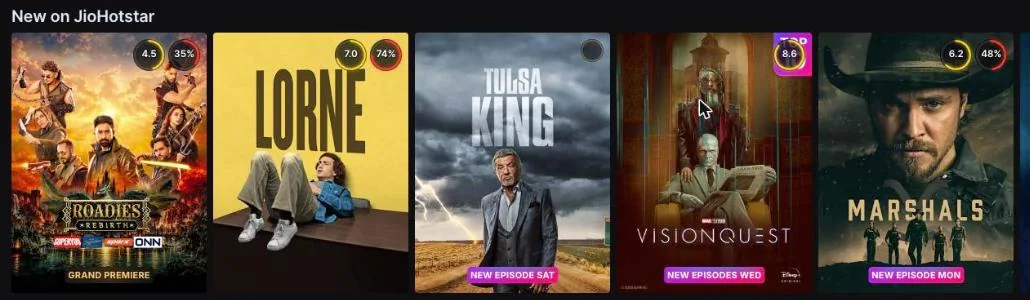
How to set it up
- Add Popcorn to Chrome from the Chrome Web Store. There is no account to create.
- Open hotstar.com in the same Chrome window and sign in as usual.
- Scroll any row. Scores appear on the posters as they load.
Reading the badges
- Yellow ring: the IMDb rating, out of 10.
- Red ring: the Rotten Tomatoes Tomatometer, the share of critics who liked it.
- Grey ring: the Rotten Tomatoes Audience Score, when one exists.
A poster with no badge has not been matched to an IMDb or Rotten Tomatoes page. Popcorn does not guess.
The yellow and red rings often disagree, especially on Indian films. Why IMDb and Rotten Tomatoes disagree, with real examples.
JioHotstar notes
- Browse rows and title pages. Scores appear on posters in every row, and on the title page above the title name.
- Indian and regional titles. Hindi, Tamil, Telugu and other Indian films usually have an IMDb rating. Many have no Rotten Tomatoes page, so they show IMDb only.
- Sports, news and live TV. Matches, news and live channels have no film ratings, so they show no badge.
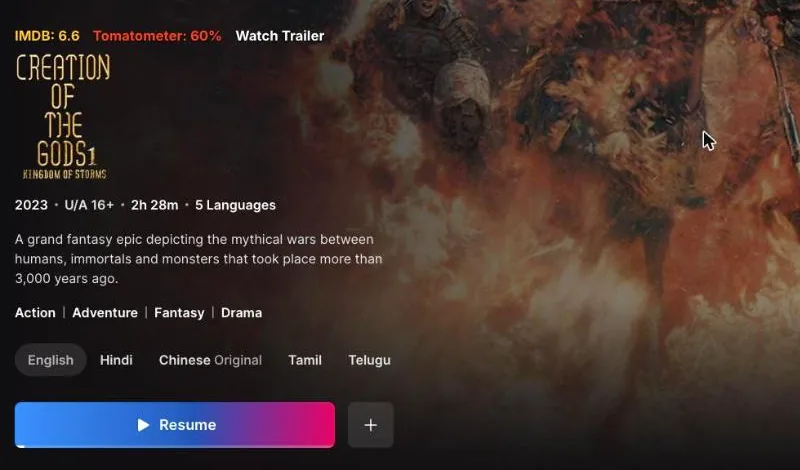
Hide what you would skip
Set a minimum IMDb or Rotten Tomatoes score in the Popcorn panel and everything below it fades on JioHotstar. Titles without a score stay visible. You can switch JioHotstar on or off from the toolbar popup without affecting the other services.
Questions
Does it work on the old Disney+ Hotstar address?
Yes. Popcorn works on hotstar.com, which is where JioHotstar runs in the browser.
Does it work in the JioHotstar app?
No. Popcorn runs in Chrome on desktop. It cannot change the JioHotstar apps on phones or TVs.
More answers are in the main FAQ, and the privacy page lists exactly what Popcorn sends.
Other services
Popcorn also works on Netflix · Prime Video · ZEE5, plus Disney+, HBO Max, Hulu, Apple TV+ and MX Player. See all features.